[AI Special Report] What is ChatGPT Work
Claude Cowork might finally have a competitor in the market. Or… maybe not.
On July 9, OpenAI launched ChatGPT Work: an upgrade to their desktop app, previously called Codex; it's now simply called ChatGPT.
Like Claude Cowork, you give ChatGPT Work an outcome. ChatGPT Work gathers what it needs from your apps and files, breaks the work into steps, and works for as long as it takes (sometimes for hours) to deliver finished material. The actual spreadsheet, the slides, the document, even a working web page.
This is the same shift Anthropic made with Claude Cowork (six months ago).
The two biggest AI providers are now pointing at the exact same idea: stop chatting with AI, start handing it work. And, yes, Google is also starting to head in this same direction.
In this article, I cover what ChatGPT Work is, what it can and can't do, and how it differs from Claude Desktop. At the end, and after testing both, I make a recommendation.
What ChatGPT actually launched
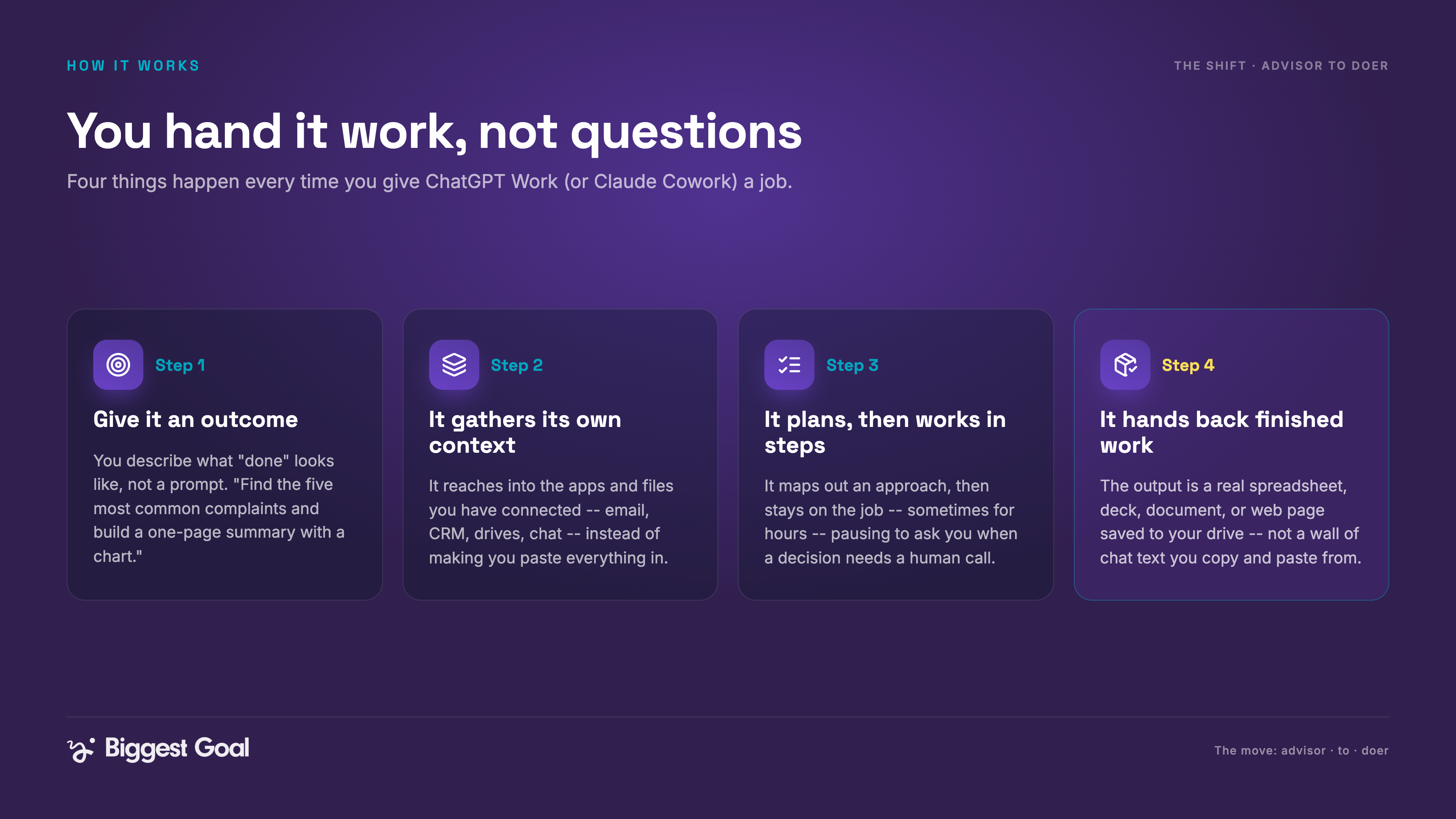
OpenAI describes ChatGPT Work as "an agent in ChatGPT that helps you take on more ambitious tasks." In plain terms, four things happen when you use it:
You give it an outcome, not a prompt. Instead of "write me an email," you say something like "look at last quarter's support tickets, find the five most common complaints, and build me a one-page summary with a chart." You describe what "done" looks like.
It gathers its own context. It reaches into the apps and files you've connected (email, your CRM, cloud drives, messaging, and so on—what it calls "plugins") to pull in what it needs, rather than making you paste everything in.
It plans, then works in steps. It maps out an approach and then works through it, staying on a complex project for hours if that's what the job takes.
It hands back finished materials. The output is a spreadsheet, a slide deck, a document, or an interactive web page you can share by link, not a wall of chat text that you have to copy and paste from.
The engine underneath is GPT-5.6, OpenAI's newest model (only available on the paid Pro account), which went live the same day.
Everyone (even you) will be going beyond chat
For the last three years, "using AI" meant chatting with AI. You'd ask it a question, copy the answer, and finish the task yourself. It was helpful, but it didn't show huge gains in efficiency for most people. You were still the one doing the work.
ChatGPT Work (just like Claude Cowork) moves the AI from advisor to doer. You're no longer typing a question and just getting words back. You're asking it to produce an outcome and getting a working deliverable back, saved on your hard drive. And while that can sound like it's not a huge deal. It is. It completely changes what you use the tool for, how you talk to it, and what a good result even looks like.
In fact, once you start using tools like ChatGPT Work and Claude Cowork, you might end up like me and stop using normal Chat completely.
Plan first, perfect, then act
The first reaction to "it works on its own for hours" is usually "What exactly is it doing while it does that?"
Plan mode
Before it starts working, ChatGPT Work will gather context, ask you questions, and provide a step-by-step plan. Spend the time upfront, even if it takes longer than you want, to get this plan right. Don't just approve it after a quick skim. Seriously. You need to ensure that AI makes as few judgment calls as possible.
Check-ins and approvals
You decide what it's allowed to touch, when it should pause and ask, and which actions need your explicit sign-off. When it hits something that needs a human call, it stops and asks rather than guessing.
You can steer mid-job
You can monitor its progress, answer its questions, and redirect it partway through if it's heading in the wrong direction. Just be sure you can identify when it is heading in the wrong direction. If you can't answer that, find someone who can.
Stay in the loop
Think of these tools like this: they're assistants who do the legwork and check with you at decision points, not robots you set loose on your systems. This flow isn't friction to switch off once you trust it. It's the mechanism that keeps your judgment in the loop while the tool does the volume.
Important Note: This is exactly how Claude Cowork works as well. I don't want this part to sound like ChatGPT's Work is doing new things that other platforms can't.
Connected apps
ChatGPT Work is only as useful as what it can see (the context it can gather). OpenAI's answer is the same as Claude's: a directory of more than 1,400 "apps" called Plugins (its word for connectors to outside tools).
You bring a tool's context into a task by typing @ and the app's name, and ChatGPT can also suggest relevant ones as it works.
The more of your tools you connect (your email, calendar, CRM, document storage, etc.), the more of your actual work it can pick up and run with (and the better context it has to do the work), instead of you playing courier between apps.
Scheduled tasks
ChatGPT Work can run tasks on a schedule, not just when you're sitting there. It can run a job once, on a recurring schedule, when a specific event happens, or continuously as a monitor.
Here are some of OpenAI's own examples:
Review your Slack updates every week and refresh a meeting agenda.
Turn a running stream of customer feedback into a prioritized list of product ideas.
Update a deck automatically whenever new feedback arrives by email.
This is the same "assign it and walk away" feature Claude Cowork has. As I always recommend: start small, improve over time.
ChatGPT Work Sites
Beyond the usual spreadsheets, slides, and docs, ChatGPT Work can produce interactive web pages and small web apps, a feature OpenAI calls Sites (currently in public beta).
Think live dashboards, a project tracker, a launch calendar, an internal reference page, or an interactive report, each shareable by a simple link. It can keep them updated as the underlying information changes.
If you've seen our Deep Dive Workshop on Claude Artifacts, you'll recognize this feature well.
For most business users, this is not just a major differentiator from chat but also something that couldn't be accomplished easily before. A user can describe a dashboard, and ChatGPT Work can build one you and your team can actually open and use.
ChatGPT Work vs. Claude Cowork
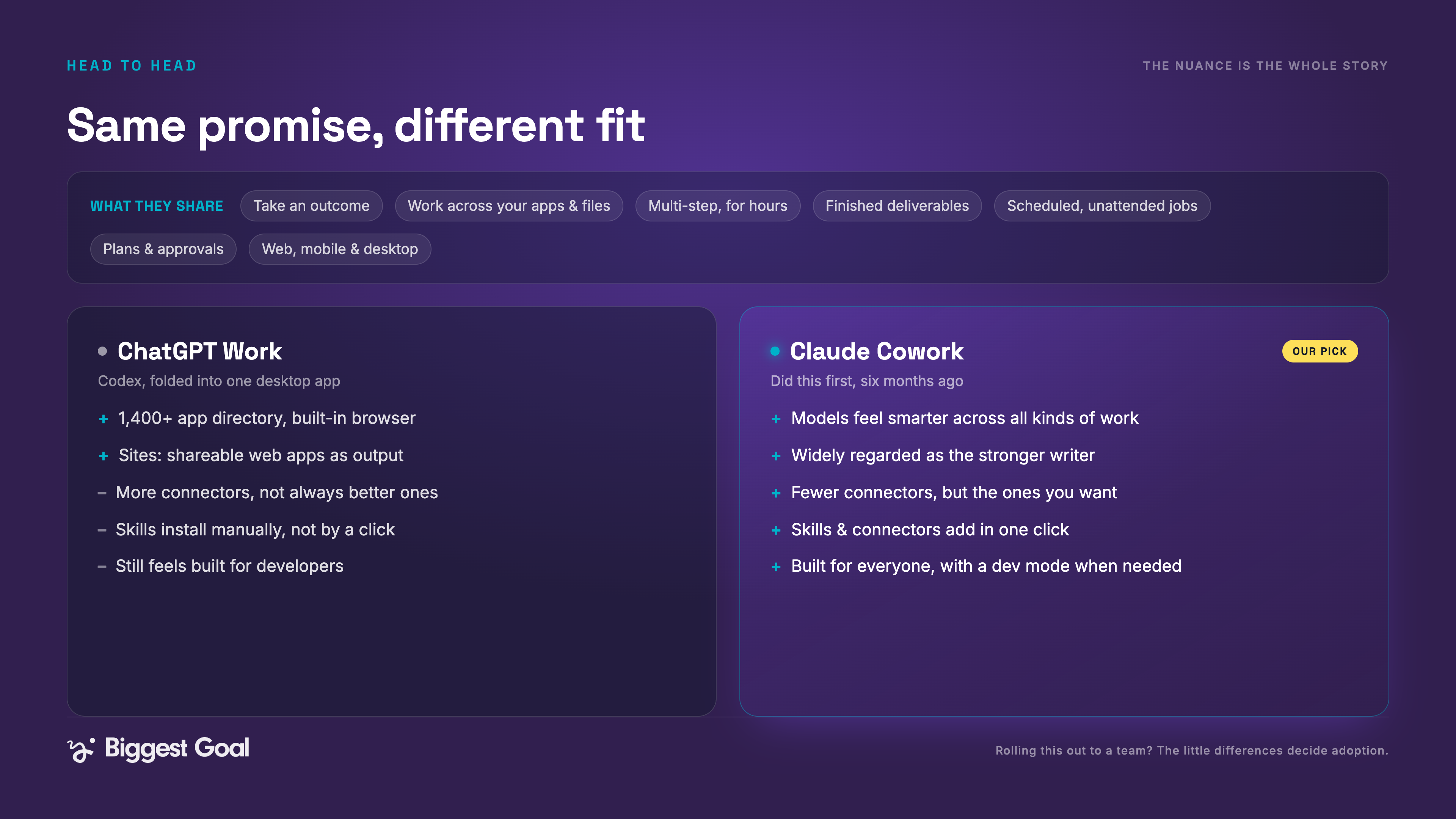
Since we have covered many Claude Cowork features before, here are a few areas in which they differ.
The short answer is that the core promise is nearly identical, but it's the nuance that makes all the difference in the world -- especially if you want to roll out this type of tool to your team.
What they share
Both take an outcome instead of a prompt.
Both work across your files and connected apps.
Both work in a multi-step fashion for extended stretches.
Both return finished deliverables.
Both can run scheduled, unattended jobs.
Both keep you in control with plans and approvals.
Both run across web, mobile, and desktop.
ChatGPT Work
OpenAI folded its coding agent (Codex) into ChatGPT, so the whole thing now lives in one desktop app alongside regular Chat.
It's absorbing OpenAI's Atlas browser "experiment" into a built-in browser inside that app, and it's betting heavily on its 1,400-plus app directory (Plugins) and on Sites (those shareable web apps) as the output format. One note here -- even though there are more apps to connect to, that doesn't mean better. For example, there is no Plugin for Make or n8n that uses its native MCP server, so you have to add it manually.
Skills, which are a key element of this type of platform, can only be installed manually or by coercing ChatGPT to install them for you.
Usability - The Codex ChatGPT App feels like it's more designed for developers.
Claude Cowork
Claude's models and Claude Code are what most developers use and are known to feel smarter and be easier to work with for a wide range of tasks, not just code.
Claude is leading the innovation here and released what ChatGPT Work is six months ago.
Claude is widely regarded as the stronger long-form writer.
Claude has fewer connections, but they're generally the ones you want.
Adding Skills and Connectors is extremely easy through the interface.
Usability - The Claude Desktop app, and Cowork in particular, feels like it's more designed for everyone. And within the Desktop app, Claude Code gives you the developer-focused interface when you need it.
A Note on Terminology
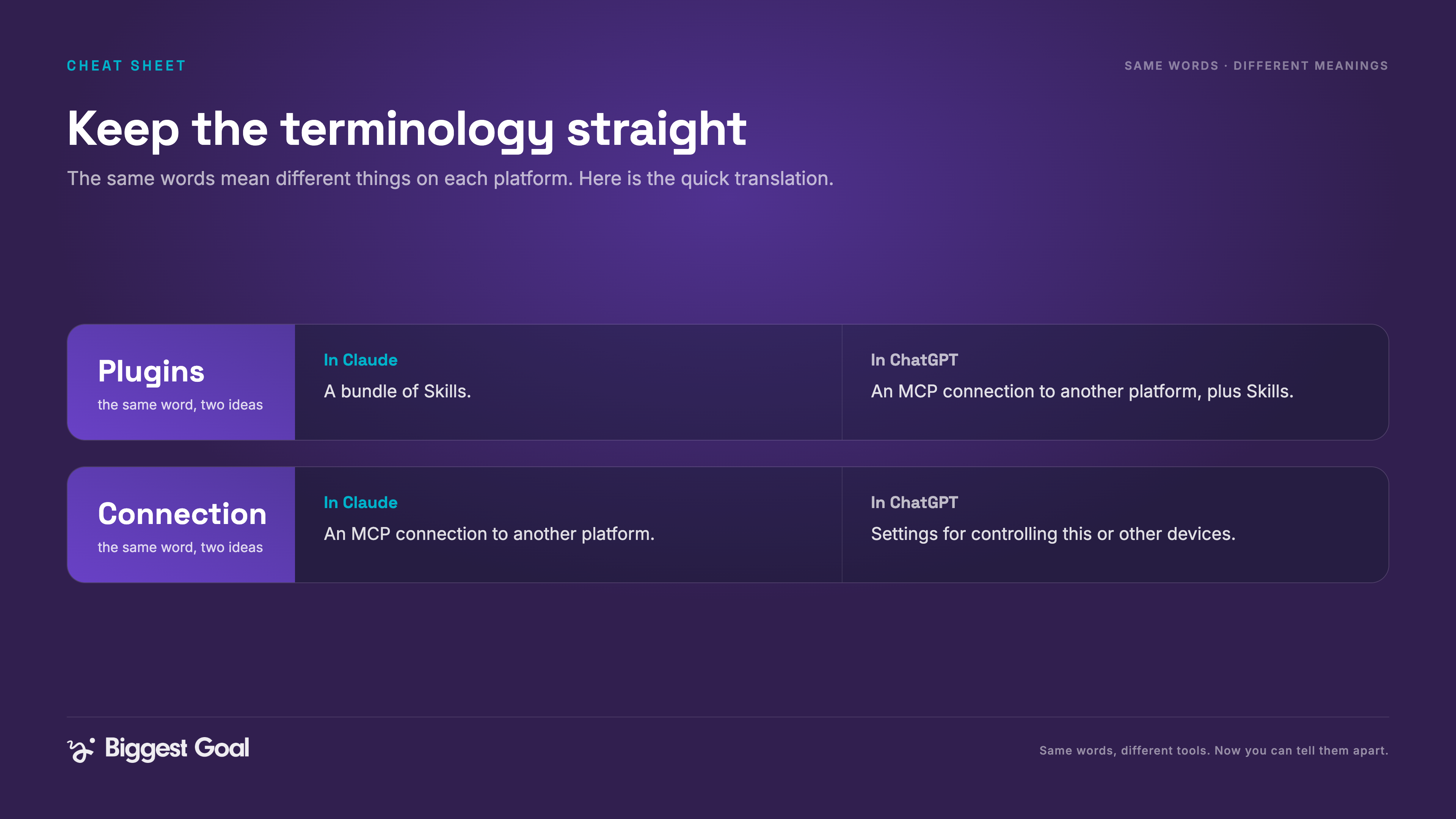
The terminology between these two platforms is... super confusing.
Here's a quick cheat sheet.
Plugins
Claude uses the term Plugins to represent a bundle of Skills
ChatGPT uses the term Plugins to represent an MCP connection to another platform and Skills
Connection
Claude's connections are MCP connections to another platform.
ChatGPT's connections are settings for controlling the computer you're on or controlling other devices.
My Recommendation: Claude Desktop
If you're a one-person business and want to experiment with ChatGPT, great!
If you want to leverage this type of tool across a team, my recommendation is 100% Claude Desktop. The little differences will make all the difference when it comes to adoption, usage, and ultimately success.
Know someone who'd find this useful?
Forward this to a colleague who still thinks of ChatGPT as a place to ask questions. They can subscribe at your.biggestgoal.ai to get our briefings daily.
Sources
Created by Biggest Goal · July 13, 2026